IoT Device Security Assessment
This IoT Device Security Assessment project presents the design and development aimed at evaluating the security posture of consumer Internet of Things (IoT) devices across network, application, and firmware layers. Motivated by the rapid expansion of IoT ecosystems and the corresponding rise in security risks, the project applies an evidence-driven methodology inspired by industry standards such as the OWASP IoT Top 10 and NIST guidelines. The assessment framework guides the structured analysis of device behaviour, cloud interactions, and internal software components, ultimately enabling a comprehensive understanding of vulnerabilities and their implications.
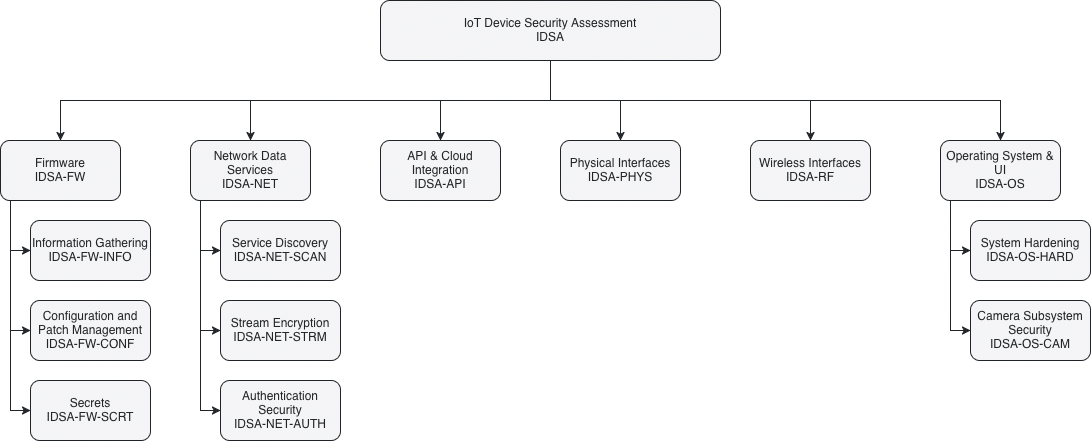
Testing Checklist
The following is the list of items to test during the assessment:
Status column can be set for values similar to "Pass", "Fail", "N/A".
Severity column can be set for values "0-5" with 0 as the lowest to 5 being the highest potential magnitude of harm or damage if a risk event occurs (how bad).
3.1 Firmware (IDSA-FW)
| Test ID | Test Name | Status | Severity | Notes |
|---|---|---|---|---|
| IDSA-FW-INFO | Information Gathering | |||
| IDSA-FW-INFO-001 | Disclosure of Source Code and Binaries | Analyze Blink updates via App; Use binwalk on RPi filesystem/EEPROM. | ||
| IDSA-FW-INFO-002 | Disclosure of Implementation Details | Check for exposed hardware specs or boot logs. | ||
| IDSA-FW-CONF | Configuration and Patch Management | |||
| IDSA-FW-CONF-001 | Usage of Outdated Software | Check apt packages on RPi; Verify Blink firmware version in-app. | ||
| IDSA-FW-CONF-002 | Update Mechanism Security | Test Blink app-based updates vs. RPi sudo apt full-upgrade security | ||
| IDSA-FW-SCRT | Secrets | |||
| IDSA-FW-SCRT-001 | Secrets Stored in Public Storage | Search for hardcoded keys in binwalk extracted files. | ||
| IDSA-FW-SCRT-002 | Unencrypted Storage of Secrets | Check /etc/ or config files on RPi; Check local cache for Blink. |
3.2 Network Data Services (IDSA-NET)
| Test ID | Test Name | Status | Severity | Notes |
|---|---|---|---|---|
| IDSA-NET-SCAN | Service Discovery | |||
| IDSA-NET-SCAN-001 | Open Port & Service Enumeration | Use nmap to identify listening ports, service versions, and OS fingerprints. | ||
| IDSA-NET-SCAN-002 | Vulnerability Scanning (NSE) | Use nmap scripting engine (NSE) to check for known CVEs on open services. | ||
| IDSA-NET-STRM | Stream Encryption | |||
| IDSA-NET-STRM-001 | Encrypted Media Streaming | Use Wireshark to verify if Blink/RPi (WebRTC) streams are encrypted. | ||
| IDSA-NET-STRM-002 | LAN Data Transmission | Monitor Wi-Fi traffic for unencrypted PII or command packets. Convert captured packets to images using Foremost. | ||
| IDSA-NET-AUTH | Authentication Security | |||
| IDSA-NET-AUTH-001 | Brute Force / Rainbow Table | Test Blink App login and RPi SSH/Local login for rate limiting. | ||
| IDSA-NET-AUTH-002 | Phishing & Session Hijacking | Evaluate Blink UI for credential harvesting risks. |
3.3 API & Cloud Integration (IDSA-API)
| Test ID | Test Name | Status | Severity | Notes |
|---|---|---|---|---|
| IDSA-API-001 | Insecure Cloud Endpoints | Intercept Blink App-to-Cloud API calls (Burp Suite). | ||
| IDSA-API-002 | Broken Object Level Auth (BOLA) | Can one user access another’s stream by changing a Device ID? |
3.4 Physical Interfaces (IDSA-PHYS)
| Test ID | Test Name | Status | Severity | Notes |
|---|---|---|---|---|
| IDSA-PHYS-001 | USB Host Detection (Win/Lin/Mac) | Does it mount as a camera/webcam or a storage device? | ||
| IDSA-PHYS-002 | Unauthorized Peripheral Access | Does plugging it in provide a serial shell or unintended file access? | ||
| IDSA-PHYS-003 | HID Attack Surface | Can the device be spoofed to act as a keyboard when plugged in? |
3.5 Wireless Interfaces (IDSA-RF)
| Test ID | Test Name | Status | Severity | Notes |
|---|---|---|---|---|
| IDSA-RF-001 | Protocol Analysis (Wireshark) | Verify WPA2/3 implementation and handshake security. | ||
| IDSA-RF-002 | De-authentication Sensitivity | Does the camera stop recording/fail insecurely during a Wi-Fi jam? |
3.6 Operating System & UI (IDSA-OS)
| Test ID | Test Name | Status | Severity | Notes |
|---|---|---|---|---|
| IDSA-OS-HARD | System Hardening | |||
| IDSA-OS-HARD-001 | Raspberry Pi OS Hardening | Check for default pi credentials or unnecessary services. | ||
| IDSA-OS-HARD-002 | Blink App UI Logic | Test for bypasses in the app’s lock screen or biometric auth. | ||
| IDSA-OS-CAM | Camera Subsystem Security | |||
| IDSA-OS-CAM-001 | Unauthorized Stream Capture | Use OpenCV to see if a secondary script can hijack the camera while the main app is running. | ||
| IDSA-OS-CAM-002 | Video Injection / Spoofing | Use OpenCV to attempt to inject a pre-recorded video loop into the stream buffer. | ||
| IDSA-OS-CAM-003 | Buffer Privacy / Local Leaks | Use OpenCV to check if sensitive frames are left in /dev/shm or tmp directories after a capture. |
Project Collaborators and Acknowledgements
We would like to take this opportunity to acknowledge the contribution of our professor Mandeep Pannu for guiding us into the right direction. This framework would not have been possible without you.
- Amer Al Sous
- Waleed Kuvailid
- Ryan Mendoza